Solved: WordPress Admin Images Missing

I upgraded this blog to WordPress 2.5 today, and installed a new copy of WordPress on a subdomain too. Both these actions were carried out using cPanel & Fantastico.

When I logged into the backend of the new subdomain there were no images – including no buttons on the rich-text editor (TinyMCE) and no WordPress logo on the login screen.  I later noticed there were also background images missing on the public part of the new blog.  When I right clicked “View background image” on the missing image, it took me to an HTTP 403 (Forbidden) meaning there was a permissions problem. The strange thing was the problem didn’t occur in the nerd. backend.

And the solution…? In this instance it was because I’d enabled hotlink protection in my server to stop other people using images stored at steveferson.com on their sites, because this eats up precious bandwidth.  When I created this new subdomain, I had forgotten about the hotlink protection and so hadn’t added it to the list of sites allowed to link to images at SteveFerson.com.  When I added it everything went back to working as expected.

Solved: Blog XMLRPC 403 Error

I was getting the above error message when I recently tried to set up and try out Windows Live Writer to let me publish to a blog from my desktop without logging into the Admin section of the site. I was felled at the first hurdle when, after entering my b2evolution blog’s details, I was presented with a message informing me that:

The server reported an error with the following URL:

http://www.blog-domain.com/b2evo-path/xmlsrv/xmlrpc.php

403 Forbidden

Thinking it might be a problem with b2evolution, I tried with a WordPress blog. A different message appeared, both on this blog and another:

Continue reading “Solved: Blog XMLRPC 403 Error”

Thunderbird/Outlook/Google Calendar Integration

Finally I can have events from my Outlook calendar in work sync with my Thunderbird calendar (enabled using the Lightning plugin) automatically. It’s wonderful… or at least it nearly is.

How It Works

I read some time back of a plugin that allows you to sync your Thunderbird/Lightning calendar (or Sunbird if you prefer to use Mozilla’s calendar in a standalone application) with your Google calendar, which I’m sure is useful for some people, but not me. I’ve never used a Google calendar really. However that memory proved useful when I heard that a Google have released a utility to allow you to sync your Google calendar with your Outlook calendar. I’m sure you can see where I’m going with this…

Continue reading “Thunderbird/Outlook/Google Calendar Integration”

Ubuntu Boot Error: “differences between boot sector and its backup”

I have my Acer Aspire laptop dual booting Ubuntu Linux with Windows XP but, despite being sympathetic to Linux and interested in learning more about it, I don’t use Ubuntu very often.  One major reason for this was the amount of time it takes to boot up.  Over time I noticed an error message and looking at it began to suspect that this error was partially responsible for the long load times.

There are differences between boot sector and its backup
… [sequences of numbers]…
Not automatically fixing this

According to this forum thread, it seems like this error may have been let loose when I changed the grub configuration to make the OS names a bit more user-friendly and have the system stop booting into Ubuntu by default (the girlfriend isn’t converted yet and even I preferred Windows for regular use). This seems to affect the MBR, which doesn’t overwrite the backup and therefore causes the above problem.

SimonU at UbuntuForums had the same problem on his Ubuntu laptop and posted a solution which I decided to borrow.

sudo cp /etc/init.d/checkfs.sh /etc/init.d/checkfsbackup.sh
sudo rm /etc/init.d/checkfs.sh

I had already hit the button to restart my PC when I thought to myself “I really should have looked at what it was doing  and made sure it was doing it to the right hard drive for my system” and started worrying that I may have just made my machine unbootable. Luckily all was ok and my laptop now boots into Ubuntu in a fraction of the time it had taken before. If I could only figure out how to stop Ubuntu overheating the laptop so much and causing the fan to run at full pelt, I’d maybe use it on a regular basis.

If that doesn’t work for you another thread talks about skipping the file system check (fsck) on FAT32 drives as an alternative solution.

Solved: Override Default HTML Title in b2Evolution 2.x

I’d set up my 1.x installation of b2Evolution to use a custom HTML title in the format:

<title>[Post/Page name – ] Blog name</title>

On installing 2.4, however, I noticed that the default title is just the post/page name if it exists and the blog name if it doesn’t (i.e. for the posts list). This was based on a function call to a function called request_title. Google didn’t tell me much about this function (not the 2.x version anyway) so I went hunting and found the function in the file: \inc\_core\_template.funcs.php

Continue reading “Solved: Override Default HTML Title in b2Evolution 2.x”

Solved: b2Evolution – Sidebar 2 [NOT INCLUDED IN SELECTED SKIN!]

I’ve just upgraded another blog from b2Evolution 1.10 to 2.4, which means reworking the skin I developed to work with the new “Skins 2.0” framework. It also means that instead of hacking html into my _main.php file, I’m going to use the customisable ‘widgets’ to create my sidebars. This is in the Blog Settings -> Widgets panel.

It seems to work pretty well. I copied a default skin (the asevo one) to a directory called proto, installed the copied skin and began changing it. I decided I wanted to keep the 3-column layout from my old 1.10 skin and luckily there is already a default container called Sidebar and another called Sidebar 2. The problem was my skin didn’t use Sidebar 2.

It was easily fixed, I created a new <div> and used the same skin_container function which the skin used to call the Sidebar widget. I just replaced skin_container( NT_(‘Sidebar’) with skin_container( NT_(‘Sidebar 2’) and it fitted in. Despite the fact the skin now used Sidebar 2, the admin interface kept telling me it didn’t. The container in the admin site said Sidebar 2 [NOT INCLUDED IN SELECTED SKIN!] and every time I tried to add a new widget I got a message saying “WARNING: you are adding to a container that does not seem to be part of the current skin” (I Googled the former error message and, to my shock, got zero results. Hopefully this post will fix that).

Solution

It still worked ok, but I don’t like things that are out of place. To solve this, it turns out all you have to do is go to Global Settings -> Skins install panel and there’s an icon beside each skin to “Reload containers”. Do that and it’ll pick up your call to Sidebar 2 and rid you of that irksome error message.

Solved: Comments Disappeared / Error after WordPress Upgrade

I’ve just upgraded a WordPress blog to the latest version 2.3.2 and when I went to write a new post I realised all my categories had disappeared. They were still in the database but the list to the right of where you type your posts was empty. As well as this, I noticed that adding new comments was giving a 404 error in the middle of the page. This second issue was reminiscent of another one I had (and solved) upgrading to 2.2 – the errors were actually 403 errors, but redirecting to 404 error pages because there was no 403 error page defined (i.e. the 404 was happening when the server looked for the 403 page).

I noticed a file called error_log (no extension) in the wp-admin directory and had a look. Apparently some database tables (‘wp_term_taxonomy’ and ‘.wp_terms’) were missing. After reading this support thread I investigated the possibility that my database was out of date. I followed MichaelH’s suggestion of navigating to /wp-admin/upgrade.php, which informed me that my database was up to date. I didn’t believe this to be true though; certainly not after learning that tables were missing. At a hunch, I guessed that when I’d been upgrading through Fantastico, I must have run out of space (a semi-regular occurrence) so the database upgrade was probably left half finished. Assuming that WordPress would determine whether or not I needed to upgrade based on a single configuration or database field I soon found the wp_option.db_version field, which was set 6124.

The Solution

As I suspected, 6124 is the db_version value for WordPress 2.3. I changed this field’s value back from 6124 to 5183 (the db_version value in WordPress 2.2) and hit the upgrade.php page again. This time it told me to upgrade, I did, and the categories are back.  Adding new categories still caused 403 and 404 errors, but that was because I’d deleted the .htaccess file created previously when trying to fix the first problem! Recreate that and we’re cooking with gas again.

Urgent Warning for Shareaza Users – Shareaza.com Hijacked

Shareaza, a popular file-sharing application that allows users to access Gnutella, Gnutella 2, ED2K (eDonkey) and BitTorrent networks has been hijacked by a company aiming to spread malware throughout the internet. The Shareaza.com site had been down since 22nd October 2007, however since 20th December, the domain has been hosting a scam site. Straight away you can tell something fishy is going on by the copyright notice on Shareaza.com:

© 1999-2008 Discordia Ltd. All rights reserved. See our Privacy Policy & License Agreement.

Users should be aware that Shareaza was always an open-source community project and so no company should have copyright to the web site and certainly “all rights reserved” looks out of place. Worst of all, the bastards changed the flag on the English language icon from a Union Jack to an American flag!

Shareaza Client Compromised – ShareazaV4.exe

It’s not just the web site that’s been compromised though. Somehow this Discordia crowd, who may (or may not) be a front for the French equivalent of the RIAA, have managed to use their ownership of the Shareaza.com domain to manipulate the update notification feature of Shareaza so that on opening the client users of Shareaza 2.3.0.0 and below are advised that a new version has been released and given the option to upgrade to version 4. Cleverly the message advises users to check the hijacked Shareaza.com site for further information. This version 4 (ShareazaV4.exe) is not a new version of Shareaza and should not be downloaded under any circumstances. Instead, users should upgrade to 2.3.0.1 from the real Shareaza site on Sourceforge (the filename is Shareaza_2.3.1.0_Win32.exe, though a x64 version is also available on the project site). This new version eliminates the aforementioned upgrade notice.

the software on offer from the hijacked site although labeled “ShareazaV4.exe”, is not Shareaza at all but likely a clone of the new malware infested iMesh/Bearshare client and should not be downloaded under any circumstances. Once installed, the software wants to install a search bar and make contact with a central server.
“Wildcard”

Breaking the Law

It turns out the owner of the Shareaza.com domain sold it to New York-based Discordia ltd who are using it to promote a file-sharing application that installs all sorts of other applications (including third-party ones) on an infected system. There have been claims that the Discordia software hosted at Shareaza.com is illegal and breaks the terms of the GPL, the licence under which genuine versions of Shareaza are released, as well as violating the United States’ Digital Millenium Copyright Act.

Hopefully the Shareaza community can win their legal challenge, however they are loose-knit and may find it difficult to organise. Initially I wondered if they should give up and rebrand altogether, possibly the path of least resistance. Doing that, however, would not only be allowing the vermin at Discordia to walk all over them, but it could also leave them open to the same action again. Incidentally, Discordia is the Roman goddess of strife. I’m sure that’s not a coincidence.

I just hope this post helps spread the word. See also the forum discussions by Shareaza users on the Shareaza.com Takeover over at ShareazaSecurity.be.
Buffalo Linktheater – Workaround for DivX Codec Issues

I was treated to a Buffalo Linktheater Wireless A & G (that’s the version with no DVD player, I think that was a US-only thing) media streamer by my wonderful girlfriend for Christmas. I’ll post a review (hopefully) in the near future, but first I need to get it set up properly. I successfully streamed some video files to it while at my parents’ house for Christmas week. I finally got round to setting it up in my own house tonight to discover a few kinks.

I have been using Windows Media Player 11 (as it’s already built in to Vista, it’s also a free download for XP) as the server to stream from. The problem is that when I tried to browse a particular folder the Linktheater seems to freeze for a while before opening it, and then showing it as empty. When I checked my PC an error message had appeared informing me that “Windows Media Player Network Sharing Service has stopped working”. On clicking “search online” for more information Windows informed me that:

This problem was caused by DivX Codec. DivX Codec was created by DivX, Inc..
DivX, Inc. is aware of this problem and working as quickly as possible to make a solution available.

The Application Event Log contains an entry for each crash with Event ID 1000 and Task Category 100 and a description something along the lines of:

Faulting application wmpnetwk.exe, version 11.0.6000.6324, time stamp 0x4549b540, faulting module divxdec.ax, version 6.8.0.0, time stamp 0x47547cff, exception code 0xc0000005, fault offset 0x0005c021, process id 0xe1c, application start time 0x01c84be4834cb5f8.

which doesn’t really help much.

Workaround

I split the folder in two, and one of the new ones worked fine. I continued like this until I had narrowed the culprit down to be one of two files. However at this stage the folders all displayed their contents fine, including the one containing only the suspects. Now they just wouldn’t play.

After a lot of moving files and much more crashing and restarting of the Windows Media Player Network Sharing Service, I narrowed the culprit down to a particular video file. I’m not sure what the problem was as it had worked fine when streamed from an XP computer also using Windows Media Player 11; in fact it was watched start to finish without any problems. It may be an issue specific to Vista or the DivX 6.8 codec, either way I’m happy it’s sorted.

If anyone finds out any more about the cause of this kind of problem or a quicker solution, please do let me know. Meanwhile I hope the above helps someone. Oh and the Buffalo Linktheater Wireless A & G is available from Dabs for about £95.

Microsoft Want to Own You

Installing Microsoft’s Virtual Earth 3D plugin for Firefox (yes, they wrote something that works in Firefox) I was reminded of one more reason why I hate Microsoft.

You’d think with all the anti-competitive suits being filed against them they’d get over this, but apparently not.

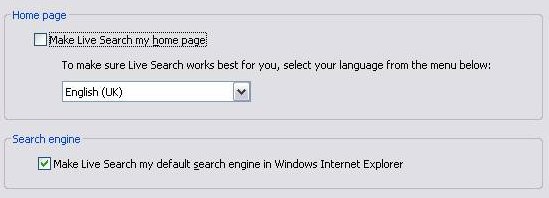
Have a look at what’s presented to you when you install the Microsoft Virtual Earth 3D plugin.
Microsoft Want to Own Your PC

Yes, that’s right, when you install Virtual Earth 3D, Microsoft try to take over your home page and default search engine: two completely unrelated services. If they must give us the option then fine, but they have the boxes ticked by default and that is where I believe they cross the line from opportunistic cross-selling to scummy, underhanded manipulation. Not that it’s a big surprise, they do the same thing with their Windows Live Messenger product. This is an even more blatant example of what they’re trying to do here, which is using their strength (and in the case of Messenger, dominance) in one market to try and dominate in another.

If it takes another legal case to sort this out then it should be done, but Microsoft should be fined and forced to pay legal costs. The previous controversy over their bundling of Media Player in Windows obviously hasn’t taught them anything.